

How we made a promo film that can't lie
The film for 0.3.0 of Caddy Configuration Tools for VS Code is a Playwright test: every step is checked against the real extension and a real Caddy, and the narration is the author's own voice, cloned on our own GPU.
TL;DR: The promo film for 0.3.0 of Caddy Configuration Tools for VS Code is not a screen recording someone performed by hand. It is a Playwright run against the freshly built extension and a real Caddy, and every step asserts that the feature it shows actually worked. The narration is the author’s own voice, cloned locally with Chatterbox Multilingual. Nothing was uploaded to make it.
Watch the film on YouTube. We link it rather than embed it: an embedded player would load Google’s servers on every page view.
A promo for an editor extension is usually a screen recording. Someone rehearses the clicks, records until a take goes right, and cuts out the mistakes. Sometimes it is worse: a mocked UI, or a video of a feature that has since changed. Either way the film says nothing about whether the extension works today.
We wanted a film that can’t lie. If a feature breaks, the film can’t be made.
The storyboard is code
The whole film lives in one file, demo/storyboard.ts. It is a list of scenes, and each scene is a list of steps. A step has five parts:
caption: the subtitle burned into the picturesay: what the voice says, when it differs from the captionact: what the user does: move the mouse, click, type, press keyscheck: a Playwrightexpectthat must pass once the act is donehold: the minimum time the step stays on screen
The storyboard has 27 steps, and every one of them has a check. The checks run in every variant of the film. If one fails, the player records the failing step in the timeline and throws, the recording stops, and there is no film. What’s left is a partial timeline that shows where it broke and what the screen looked like at that point.
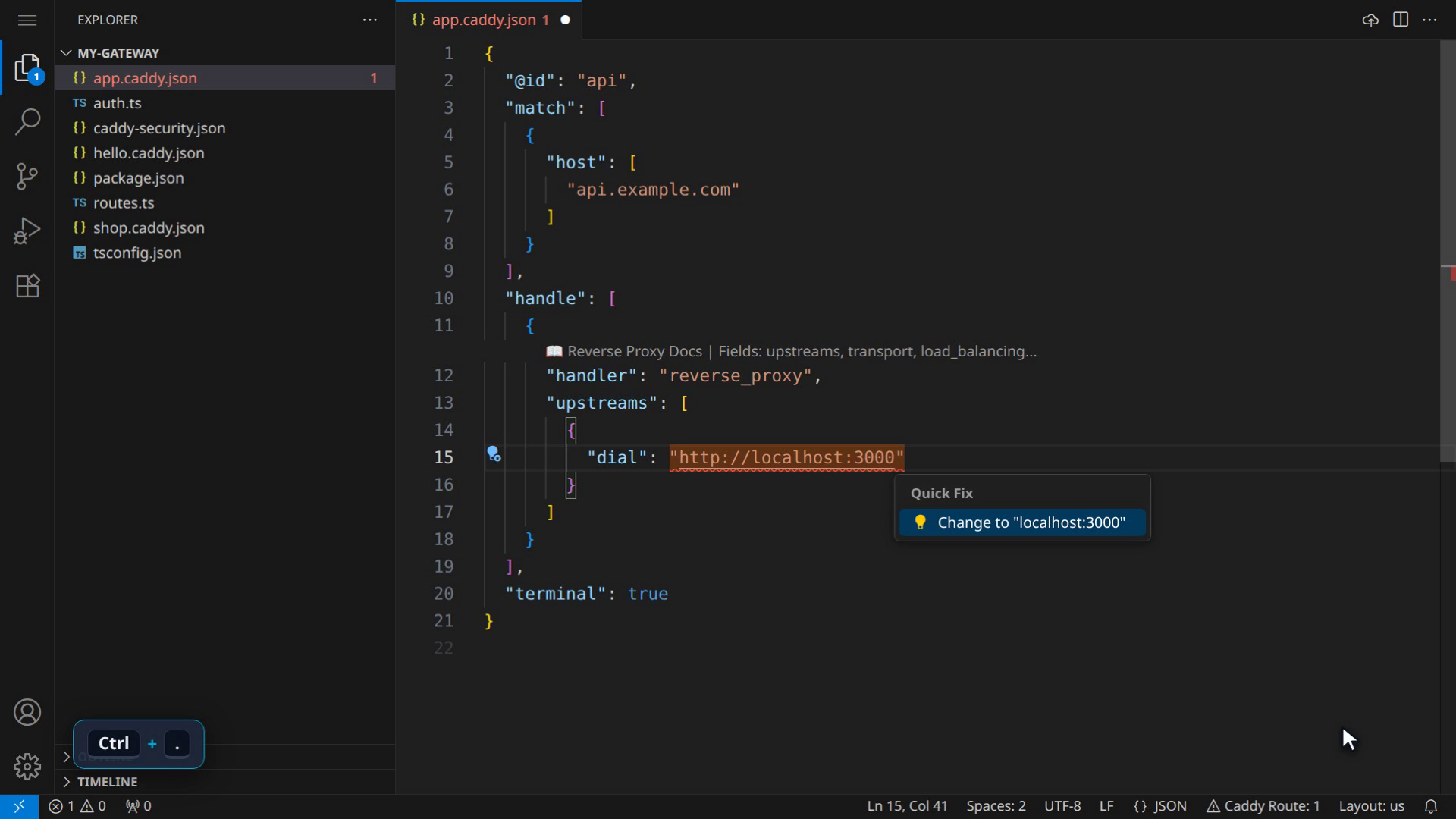
Here is the step where the URL quick fix is applied. The previous step typed http://localhost:3000 into a dial field, out of habit, where Caddy wants host:port:
{
  caption: "Ctrl+. offers the fix…",
  say: "Control period offers the fix,",
  act: async (page) => {
    await park(page);
    await press(page, "Control+.");
  },
  check: async (page) => {
    await expect(actionMenu(page)).toContainText('Change to "localhost:3000"', {
      timeout: 10000,
    });
  },
  hold: 1600,
  still: "02-quick-fix",
  clip: "quick-fix",
},
If the extension stops offering that code action, or renames it, the recording fails here.
The rules for an act are written at the top of demo/lib/types.ts: only what a user can do in VS Code. No writing files behind the editor’s back, and no running commands through an API. The extension has to produce everything you see.
A real editor and a real Caddy
Before anything is filmed, demo/global-setup.ts builds the extension with npm run package and installs the new .vsix into code-server. It does that on every run unless we explicitly tell it to reuse the last build, because a recording has to show the extension as it is now.
The same setup starts a throwaway Caddy with caddy run: an admin API on one port and one empty HTTP server on another. The extension’s settings point caddy.adminUrl at that admin port.
The “apply to running Caddy” scene goes through that admin API. The extension’s live commands use CaddyClient from @viaalink/caddy-api-client, our TypeScript client for Caddy’s Admin API. Then the film opens a terminal and types a real curl:
{
  caption: "It is live. curl it.",
  say: "And it is live: one curl, and the new route answers right away.",
  act: async (page) => {
    const caddy = liveCaddy();
    // Clear of the "Caddy updated" toast at the bottom right.
    await park(page, { x: 1000, y: 380 });
    await press(page, "Control+Backquote");
    await expect(page.locator(".terminal-wrapper").first()).toBeVisible({ timeout: 10000 });
    await beat(page, 900);
    await type(page, `curl -s localhost:${caddy?.http ?? 8080}`);
    await key(page, "Enter");
  },
  check: async (page) => {
    await expect(terminalText(page)).toContainText("Hello from Caddy Tools!", {
      timeout: 10000,
    });
  },
  hold: 2400,
  still: "03-live-apply",
},
If the route never reaches Caddy, the terminal never prints “Hello from Caddy Tools!” and the film stops there.
What is staged
Some of it is set up for the camera, and we’d rather say so:
- The starting project is seeded. The files in
demo/seed/are copied fresh for every recording, so the line numbers in the storyboard always match. The route that answers thecurlis one of those seed files: astatic_responsehandler with the bodyHello from Caddy Tools!. The extension sends it to Caddy, and Caddy answers with it. - code-server is dressed for the camera. Dark theme, a larger font, no minimap, no welcome page and no telemetry. The terminal prompt reads
my-gateway $, so no user name or home path ends up in a public video. - The cursor is drawn. Playwright drives the mouse through the Chrome DevTools Protocol, so the recording has no pointer at all, and a viewer would see menus open by themselves.
demo/lib/overlay.tsinjects a small layer that draws an arrow following everymousemove, a ripple on every click, and a badge such as “Ctrl + Space” before a shortcut is pressed. The layer haspointer-events: noneand sits outside the workbench’s DOM, so it can’t intercept a click. - The title and end cards are made by ffmpeg, not recorded.
Voice first, picture follows
Usually you record the picture and then squeeze the words into its gaps. We turned that around.
The voice stage runs before the recording. It speaks every line of the storyboard and writes voice.json: for each line, the audio file and how many milliseconds it lasts. The player in demo/lib/player.ts reads that file and holds each step on screen for at least max(hold × pace, spokenMs + tailMs(line)). The time the act itself takes counts towards that window, so a step that spends two seconds typing doesn’t then sit still for another two.
The pause after a line depends on how the line ends:
function tailMs(line: string): number {
  const end = line.trim().slice(-1);
  if (end === "," || end === "…" || end === ":") return 120;
  if (end === "?") return 300;
  return 350;
}
A comma means the thought goes on, so the next line follows almost at once. A question gets a beat, and a full stop a little more. This replaced a flat 450 ms after every line, which made the narration sound like a list being read out.
One ffmpeg pass
demo/scripts/render.ts turns the recording and its timeline into the finished film. One ffmpeg filter graph does the main work: the title card, the recording with the leader trimmed and the captions burned in as ASS subtitles, and the end card, all concatenated. Every voice line is dropped in at its step’s start with adelay and mixed with amix. One encode keeps the editor text sharp.
The render stage also writes:
- an
.srtfile with the captions timed to the finished film steps.png, a contact sheet with one numbered still per step, to review without watching- clean stills (no captions) for steps marked
still, cut from the raw recording - a GIF for steps that share a
clipname, for the README
There are two variants of the same storyboard. promo has the cards, plain captions and the voice. qa has no cards, runs at 1.6 times the pace, includes six extra steps, and numbers its captions (“12. Scene · caption”) so a bug report can say “it breaks at 12”. Both variants do the same thing to the editor.
The voice clone
The narration is the author’s own voice, made by a clone that runs on our own machine. It lives in a shared package, packages/voice-clone, so every project can use it.
The engine is Chatterbox Multilingual, running locally on our own GPU. The reference recordings, the model weights and the output stay on that machine. Chatterbox marks its output with a Perth watermark, and we leave that on: a film with a synthesised voice in it should carry the mark that says so.
Recording the reference
bin/record.ts is a terminal prompter. It first records five seconds of room tone, then shows one sentence at a time from a reading sheet. The English sheet, sheets/en.txt, has 54 sentences in sections: warm-up, product, numbers, questions, general coverage, and two held-out lines. Takes are recorded raw: 48 kHz, 24-bit mono, with no processing. After each take it checks the level and lets you play, redo or move on.
bin/reference.ts builds the clip the clone learns from. The warm-up takes become the head (at least 10 seconds, which is where Chatterbox reads timbre from), followed by every other take. The two held-out sentences never enter the reference. They are only used to measure how much the clone sounds like the real voice.
Best of N, heard back
A synthesised take can drop a word, or make a noise that a person doesn’t. So every line is generated more than once (three takes by default), and each take goes through two checks before it can be used:
- Read-back. whisper.cpp, also running locally, transcribes the take. If any word of three letters or more is not heard back, the take is incomplete. The letter error rate is reported as a second signal. A complete take always beats an incomplete one, however clean it sounds. If no take of a line is complete, the render fails with that line in the error message.
- Artefacts.
tts_artefacts.pyscreens each take for rumble, whistling tones, clicks and buzz, the noises a vocoder makes when it loses track of the speech.
Measuring similarity
voice-similarity.py compares the speaker embedding of each generated line with the embedding of the two held-out recordings, using Chatterbox’s own voice encoder. The floor is 0.80. The 21 lines of the promo average 0.825. One short line, “Pick host, type the domain.”, scores 0.73, below the floor. The script reports the numbers and decides nothing on its own: we listen to the result before it goes out.
What went wrong, and what we fixed
The first cut sounded choppy. Worse, you could hear a hiss switch on at the start of every line and switch off at the end.
The cause: Chatterbox copies the room of the reference along with the voice. Our reference was recorded on a webcam microphone, so every take carried that room’s hiss. Between lines the film is digital silence, so the hiss came and went with every sentence. We had also normalised the loudness of each line separately, which made it worse: per-line normalisation lifts the noise of short lines and makes neighbouring lines jump in level.
The fix is cleanChain() in src/speak.ts, applied to every take:
export function cleanChain(): string {
  // -55 dB, not -45: a word's own decay ("again") sits around -45 and was being
  // cut. Keep 50 ms before the first word and 150 ms after the last, then fade.
  const trim = (keep: number) => `silenceremove=start_periods=1:start_silence=${keep}:start_threshold=-55dB`;
  const rnn = existsSync(RNNOISE_MODEL) ? `arnndn=m=${RNNOISE_MODEL}:mix=0.9,` : "";
  return [
    "aresample=48000",
    "highpass=f=80",
    `${rnn}afftdn=nr=10:nf=-65:tn=1`,
    trim(0.05), "areverse", trim(0.15), "areverse",
    "afade=t=in:d=0.01",
    "areverse", "afade=t=in:d=0.08", "areverse",
  ].join(",");
}
In order: a high-pass at 80 Hz for rumble, RNNoise (ffmpeg’s arnndn) to take the hiss out of the pauses, a light FFT denoise for the steady floor that is left, a trim of both ends at -55 dB, and a 10 ms fade in and 80 ms fade out so no line starts or stops on a click. It is gentle on purpose: a heavier denoise starts eating consonants.
After the cleanup, all lines get one flat gain together, so the voice as a whole lands on -16 LUFS, followed by a limiter. The lines keep their natural balance. That approach came from the voice pipeline of an earlier project of ours.
With this in place the hiss no longer switches on and off with every sentence: a spectrogram of a line before and after shows the steady noise floor between words gone, and every line now starts and ends on silence. In the finished promo, speech fills about 91% of the screen recording.
Two smaller problems:
- Acronyms. whisper hears “API” as “A.P.I.”, so the missing-word check flagged it on takes that were fine. Acronyms that are read letter by letter (API, URL, CLI, DNS, JSON and a few more) are now skipped by that check.
- Short lines. One-liners such as “It is live.” finished long before the action on screen did, and left the picture running in silence. We rewrote them to fill the action: “It is live.” became “And it is live: one curl, and the new route answers right away.”
What’s next
The same storyboard, voice and render pipeline is being turned into a shared package, so the films for the Viaalink CLI and Relay can be made the same way.